
AI/ML Technical Content Strategist

This month has truly been explosive for the text-to-image modeling world, thanks to the release of numerous new models that push the boundaries of the technology. These releases, namely Z-Image-Turbo, Flux.2 Dev, Ovis-Image, and LongCat Image, all came at roughly the same time in late 2025. Each offers unique advancements over previous technologies and improved training paradigms.
In this review, we will compare how these models perform while running on DigitalOcean’s Gradient GPU Droplets. In particular, we will consider the cost and the efficiency of the model, the capabilities of the model, and the overall quality of the outputs. Our goal is to demonstrate where these models shine across highly varied image generation tests, and ultimately prove which is the best model for whichever task you seek to use AI for.
Follow this tutorial to learn more about these models and when to use them!
Key Takeaways
- Z-Image-Turbo is the most efficient and cost-effective model, while also being the most versatile
- Flux.2 Dev has the best prompt adherence, and its unified nature makes it excellent for image editing and other tasks as well
- Ovis-Image doesn’t seem to reach the level of text generation quality we expected
- LongCat-Image is a capable image generator, but doesn’t quite measure up to Z-Image-Turbo and Flux.2 Dev
Prerequisites
- GPU Droplet with sufficient VRAM. An NVIDIA H200 is recommended
- Sufficient experience working with Gradient Cloud GPUs using the terminal. For a primer on getting started, see the tutorial here
- Access to Hugging Face
Introducing the Models
In this section, we introduce each of the models along with their advertised strengths and unique advancements they bring to the table. Each model was developed independently with their own training sets and architectural designs.
Z-Image-Turbo
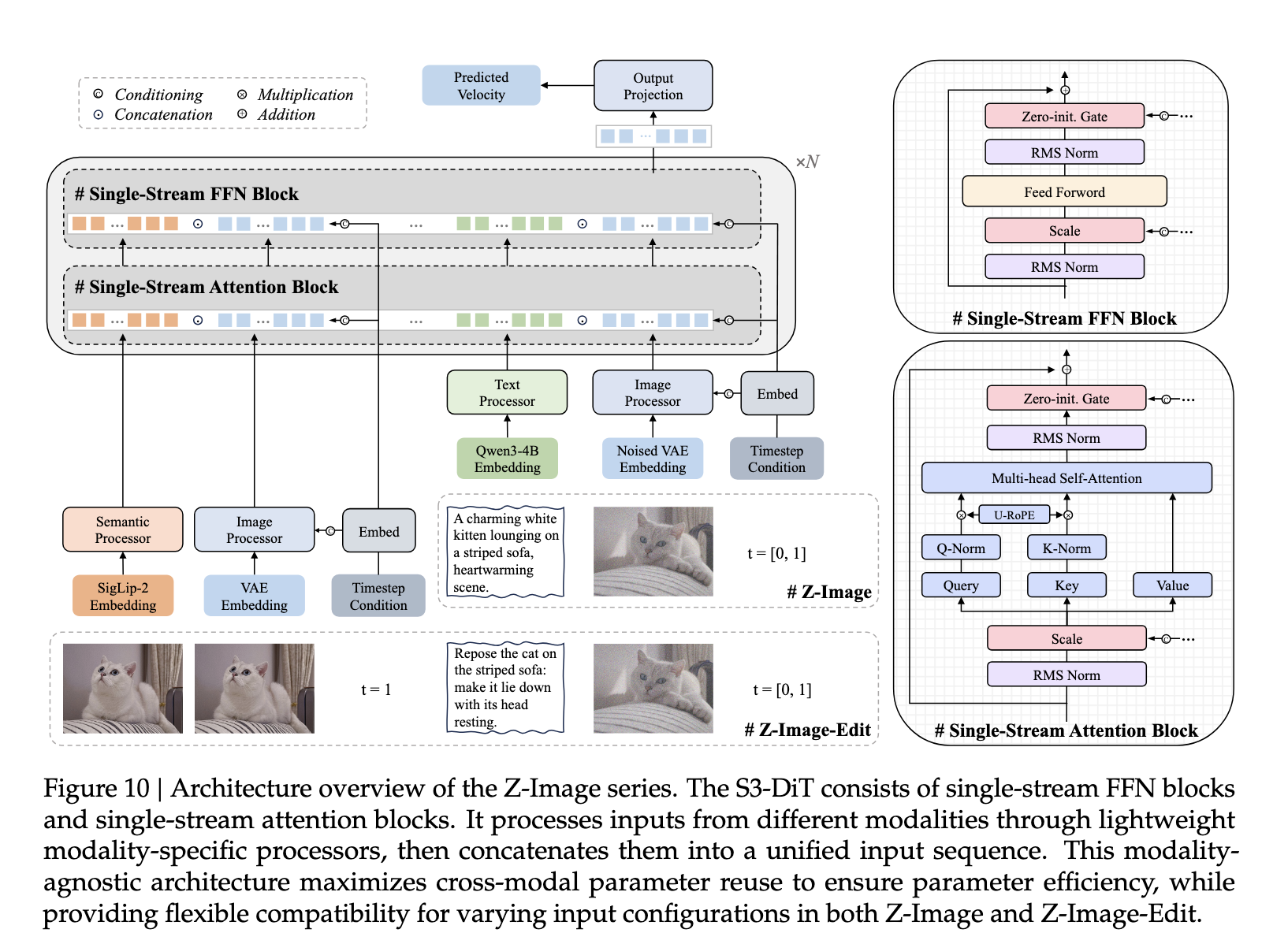
Z-Image-Turbo is the model currently leading all of these in total downloads on HuggingFace.co, and for very good reason. At just 6b parameters, this lightweight model outperforms previous SOTA open source models at a fraction of the size. This is possible because of the unique training strategy and Scalable Single-Stream Multi-Modal Diffusion Transformer (S3-DiT) architecture the model is built on. Together, the data infrastructure maximizes the utility of real-world data streams, leading to ultra-efficient training, and the S3-DiT architecture ensures that it facilitates dense cross-modal interaction at every layer during training, allowing for superior performance on a compact model design.
Z-Image-Turbo is the distilled version of the original Z-Image. It is distilled to allow for ultra-fast inference, with the best results advertised to be achievable in as few as 9 steps. This combination of speed and light-weight design has quickly rocketed Z-Image-Turbo to the top of the popularity list across various image generation communities.
Flux.2 Dev
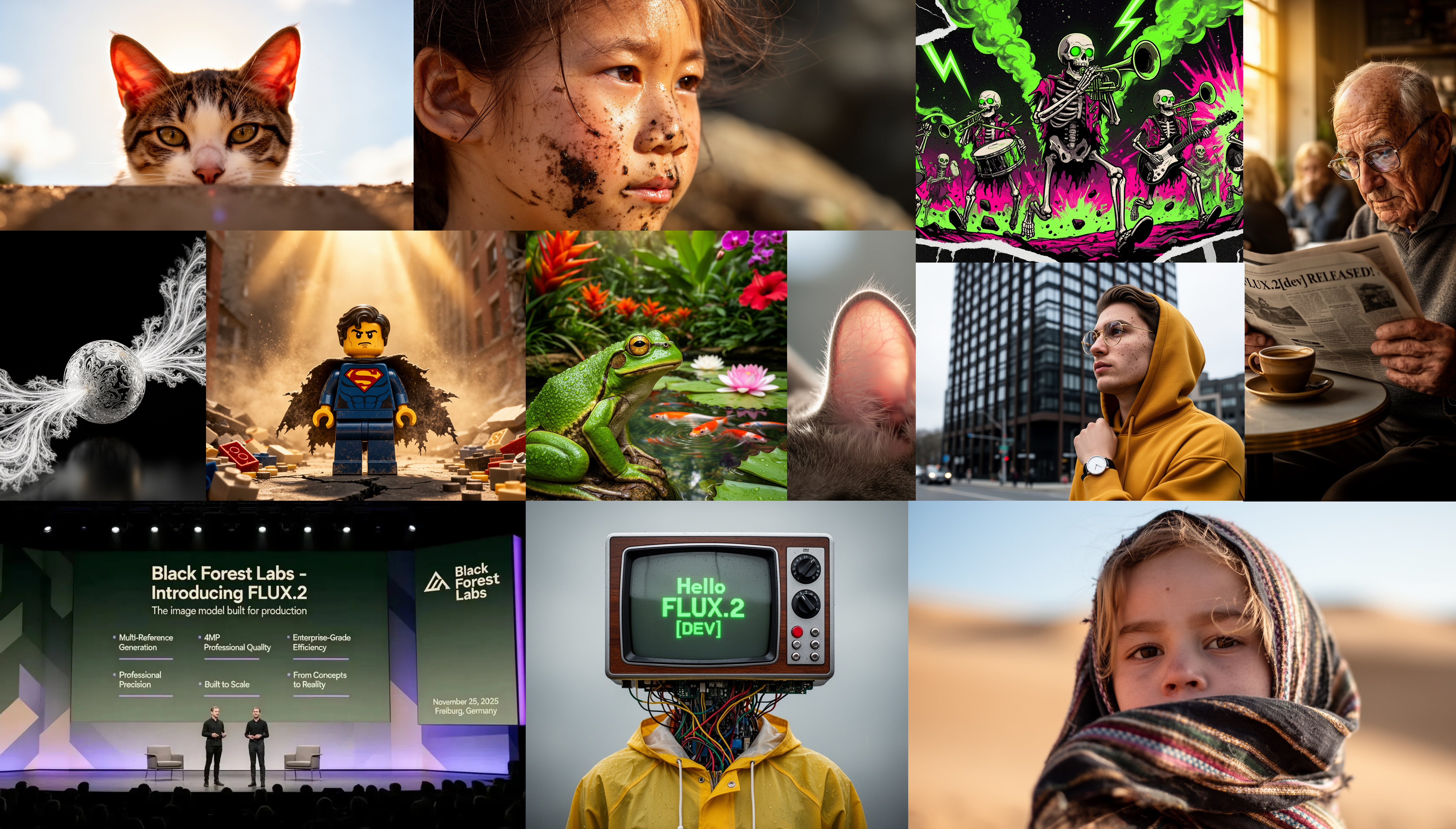
Released just before Z-Image-Turbo, Flux.2 Dev and its other variants are the latest and greatest models from the Black Forest Labs team. It generates high-quality images while maintaining character and style consistency across multiple reference images, following structured prompts, reading and writing complex text, adhering to brand guidelines, and reliably handling lighting, layouts, and logos. FLUX.2 can also do image editing on images up to 4 megapixels while preserving detail and coherence.
Overall, especially at 32b parameters, Flux.2 is significantly more costly and slower to run than all of the other models in this comparison guide. At the same time, it also demonstrates higher prompt adherence, a great variety of styles, and additional capabilities that more than make up for its size.
Ovis-Image
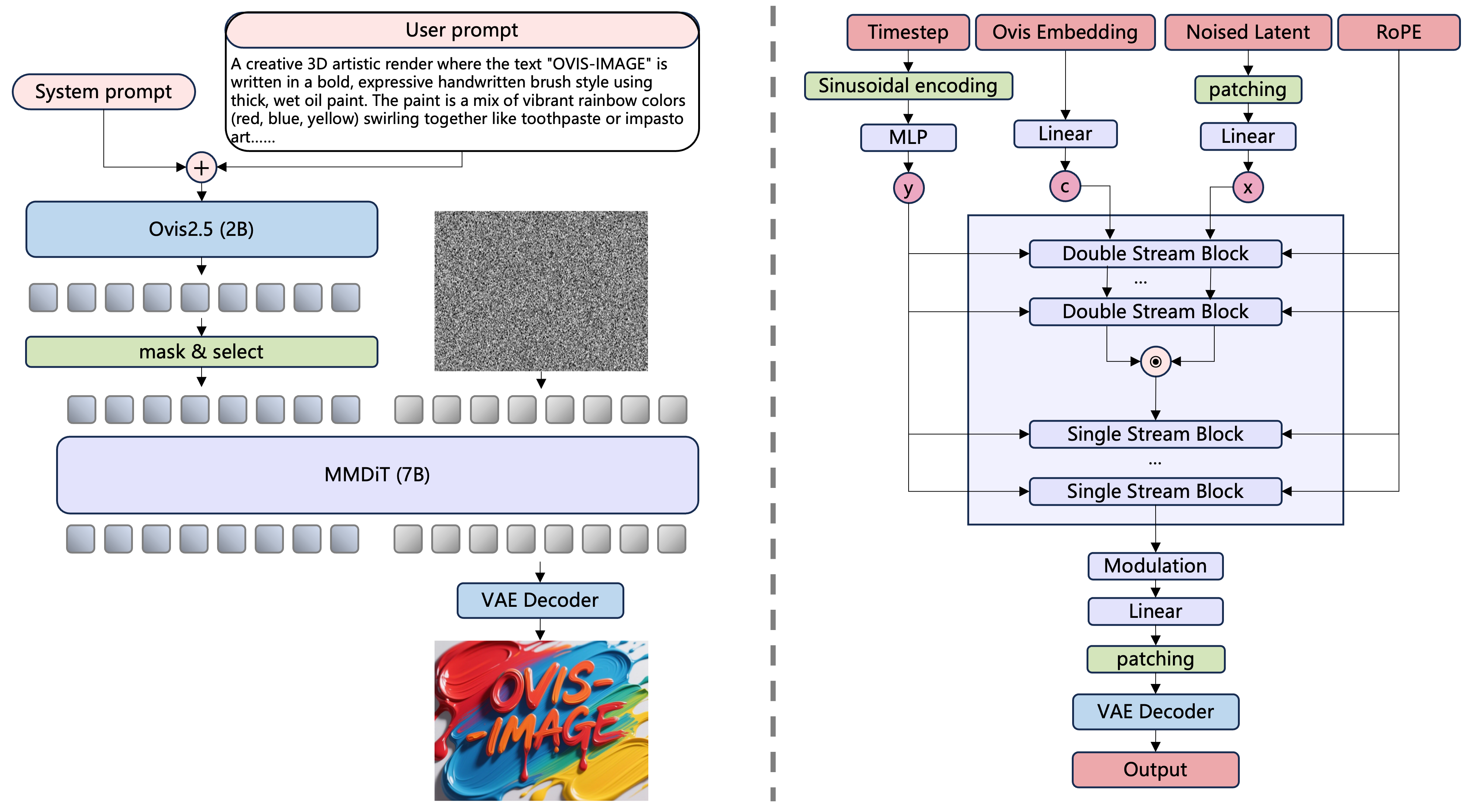
As they describe it on their official model card, “Built upon Ovis-U1, Ovis-Image is a 7B text-to-image model specifically optimized for high-quality text rendering, designed to operate efficiently under stringent computational constraints” (Source). At this small size, the model boasts that it has text rendering capabilities comparable with larger models like Qwen Image. The model excels at tasks where linguistic content must tightly align with typography, reliably producing clear, correctly spelled, and meaningful text for posters, logos, UI mockups, and infographics in varied fonts and layouts without sacrificing visual fidelity.
Overall, the model is not designed for tasks like photorealism or animation, and is expected to struggle in comparison to the other models on tasks where aesthetics are the main requirement. It is however excellent at text rendering, and may be useful for pipelines where such a task is all that is required. They achieved this with a unique and curated data training pipeline that had coordinated data curation at each stage of pre-training, mid-training, and SFT. This model also has a dev variant for LoRA training and an editing variant of the model that perform very well.
LongCat-Image
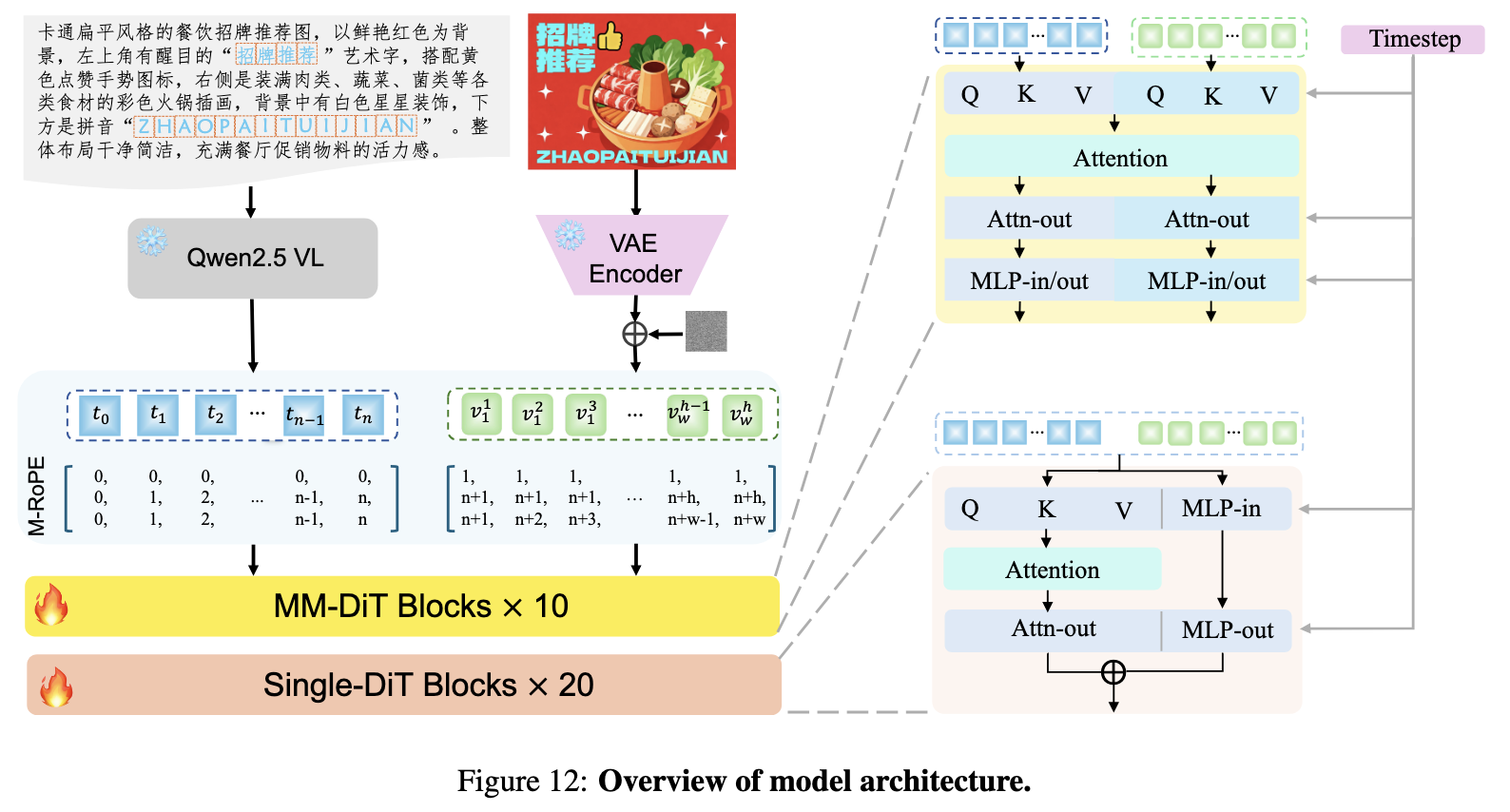
LongCat Image is, in their own words, “a pioneering open-source and bilingual (Chinese-English) foundation model for image generation, designed to address core challenges in multilingual text rendering, photorealism, deployment efficiency, and developer accessibility prevalent in current leading models” (Source). From the Meituan LongCat team, this 6b model is exceptional in that it provides outstanding Chinese and English text rendering capabilities and outstanding photorealism generation capability.
In practice, LongCat Image is the latest of the models reviewed in this article, and shows extreme abilities in photorealism generation despite its small size. The model is also notable for having a dev variant for LoRA training and an edit variant for image editing.
Comparing the Image Models
To compare the image models, we need to create sufficient tests to compare and contrast their capabilities. For this purpose, we have defined three tasks we will aim to complete using each of the models:
- Measuring the time it takes to generate 1000 images: this is the most straightforward and arguably important test, we will use it to determine which model is the least costly to run at scale
- Ability to deal with text rendering from prompts: this will be a quantitative assessment of the ability to generate complete sentences in English within the image. We will consider word error rate as a percentage for each across ten images with different prompts
- Prompt adherence on complex prompts: this will be a qualitative assessment of each model’s capabilities at adhering to the input prompt. We will consider object content, subject understanding, and spatial awareness in particular
For this analysis, we are going to use the ComfyUI on a NVIDIA H200 GPU, and the FP16 versions of each diffusion model as the base image generator. The conditions for generating each image will be the same across all 3 test types. We will use the default workflows provided by ComfyUI for each test.
These workflows can be found here:
Follow along in this section for the results of each assessment task.
Time to 100 Images Generated
In this section, we look at the measures of time required for each model to generate 100 images. From this, we can make inferences about how much the model will cost to run at scale. Each 1024x1024 image was generated with 20 steps using the same sampler and scheduler. The model was pre-loaded, so model loading times were not considered in this experiment.
The results are shown below.
| Model | Batch Size | Time (seconds) | Time (hh:mm:ss) |
|---|---|---|---|
| Z-Image-Turbo | 100 | 279.43 | 00:04:39 |
| Flux.2 Dev | 100 | 1152 | 00:19:12 |
| Ovis-Image | 100 | 507.92 | 00:08:28 |
| LongCat-Image | 1 | ~1200 | ~00:20:00 |
In short, Flux.2 Dev is significantly slower than than the next slowest model, likely LongCat-Image though we had an acknowledgedly flawed methodology, and Z-Image-Turbo is nearly twice as fast as the second fastest, Ovis-Image. Z-Image-Turbo is the clear front runner in speed, and that is no real surprise. The model was designed to run at even lower step counts (9 on the default workflow), and has innovations such as the Scalable Single-Stream Diffusion Transformer (S3-DiT) architecture that make the model incredibly efficient compared to the competition. All together, It is evidently ahead of all the other models in this review in terms of cost effectiveness.
Text Rendering
Text rendering is a more complex problem, as we need to actually read the text rendered and compare it with the original input to verify how accurate the result is. We also need a measurement of the word error rate to get a good idea of this accuracy.
To solve this task, we are going to use Nanonets-OCR, a fantastic tool for accurate transcription of text from images to textual data form. By pipelining the original text input with the LLM output, we can then use another lightweight LLM, gpt-oss 20b, to compare them. This will allow us to automatically assess the capability of each model with a modular pipeline. We can run this one time for each folder containing a set of images with inputs from each model. The process isn’t perfect, but it gives a good estimate of the word error rate without requiring more than the minimal human intervention. Here is a code snippet that runs this process:
from PIL import Image
from transformers import AutoTokenizer, AutoProcessor, AutoModelForImageTextToText
from transformers import pipeline
import torch
import os

model_path = "nanonets/Nanonets-OCR2-3B"

model = AutoModelForImageTextToText.from_pretrained(
    model_path,
    torch_dtype="auto",
    device_map="auto",
    attn_implementation="flash_attention_2"
)
model.eval()

tokenizer = AutoTokenizer.from_pretrained(model_path)
processor = AutoProcessor.from_pretrained(model_path)


def ocr_page_with_nanonets_s(image_path, model, processor, max_new_tokens=4096):
    prompt = """Extract the text from the above document as if you were reading it naturally. Return the tables in html format. Return the equations in LaTeX representation. If there is an image in the document and image caption is not present, add a small description of the image inside the <img></img> tag; otherwise, add the image caption inside <img></img>. Watermarks should be wrapped in brackets. Ex: <watermark>OFFICIAL COPY</watermark>. Page numbers should be wrapped in brackets. Ex: <page_number>14</page_number> or <page_number>9/22</page_number>. Prefer using ☐ and ☑ for check boxes."""
    image = Image.open(image_path)
    messages = [
        {"role": "system", "content": "You are a helpful assistant."},
        {"role": "user", "content": [
            {"type": "image", "image": f"file://{image_path}"},
            {"type": "text", "text": prompt},
        ]},
    ]
    text = processor.apply_chat_template(messages, tokenize=False, add_generation_prompt=True)
    inputs = processor(text=[text], images=[image], padding=True, return_tensors="pt")
    inputs = inputs.to(model.device)

    output_ids = model.generate(**inputs, max_new_tokens=max_new_tokens, do_sample=False)
    generated_ids = [output_ids[len(input_ids):] for input_ids, output_ids in zip(inputs.input_ids, output_ids)]

    output_text = processor.batch_decode(generated_ids, skip_special_tokens=True, clean_up_tokenization_spaces=True)
    return output_text[0]


model_id = "openai/gpt-oss-20b"

pipe = pipeline(
    "text-generation",
    model=model_id,
    torch_dtype="auto",
    device_map="auto",
)

lst = []

count = 0

original_prompt_1 = '''spell the following words in block letters over a white background: "there is a cow in the field. the cow is covered in spots. the cow goes moo!"'''
original_prompt_2 = '''spell the following words in bold block letters over a deep navy-blue background: "there is a bird on the fence. the bird has bright feathers. the bird starts to sing!" use thick sans-serif lettering in neon yellow with subtle glow '''
original_prompt_3 = '''spell the following words in tall block letters over a textured parchment background: "there is a dog in the yard. the dog is covered in mud. the dog runs fast!" use condensed serif lettering in dark brown ink'''
original_prompt_4 = '''spell the following words in rounded block letters over a vibrant red background:   "there is a cat on the roof. the cat is watching closely. the cat jumps down!"   use playful bubble-style font in white with black outline'''
original_prompt_5 = '''spell the following words in heavy industrial block letters over a black background:   "there is a truck on the road. the truck is loud and slow. the truck rolls on!"   use metallic silver lettering with sharp edges '''

for i in sorted(os.listdir('input_imgs')):
    count +=1
    prompts = {1: original_prompt_1, 2: original_prompt_2, 3: original_prompt_3, 4: original_prompt_4, 5:original_prompt_5}
    image_path = f"input_imgs/{i}"
    result = ocr_page_with_nanonets_s(image_path, model, processor, max_new_tokens=15000)
    print(i)
    print(prompts[count])
    print('----------')
    messages = [
    {"role": "user", "content": f"What is the word error rate between the original input words (found in quotes in the following sentence: {prompts[count]}) and the final output (all text following: {result})"},
    ]

    outputs = pipe(
        messages,
        max_new_tokens=1024,
    )

    # print(outputs[0]["generated_text"][-1])
    print('----------')
    messages = [
    {"role": "user", "content": f'Extract the value for the word error rate from {outputs[0]["generated_text"][-1]}. Do not type any additional text besides the values for the WER as a decimal value'},
    ]

    outputs2 = pipe(
        messages,
        max_new_tokens=1024,
    )
    # print(outputs2[0]["generated_text"][-1])
    try:
        print(outputs2[0]["generated_text"][-1]['content'].split('assistantfinal')[1])
        lst.append(outputs2[0]["generated_text"][-1]['content'].split('assistantfinal')[1])
    except:
        lst.append(outputs2[0]["generated_text"][-1])


try:
    final_out = sum([float(i) for i in lst])/5
    print(final_out)
except:
    print(lst)
We used the following prompts to generate the images from each model:
- spell the following words in block letters over a white background: "there is a cow in the field. the cow is covered in spots. the cow goes moo!
- spell the following words in bold block letters over a deep navy-blue background: “there is a bird on the fence. the bird has bright feathers. the bird starts to sing!” use thick sans-serif lettering in neon yellow with subtle glow
- spell the following words in tall block letters over a textured parchment background: “there is a dog in the yard. the dog is covered in mud. the dog runs fast!” use condensed serif lettering in dark brown ink
- spell the following words in rounded block letters over a vibrant red background: “there is a cat on the roof. the cat is watching closely. the cat jumps down!” use playful bubble-style font in white with black outline
- spell the following words in heavy industrial block letters over a black background: “there is a truck on the road. the truck is loud and slow. the truck rolls on!” use metallic silver lettering with sharp edges
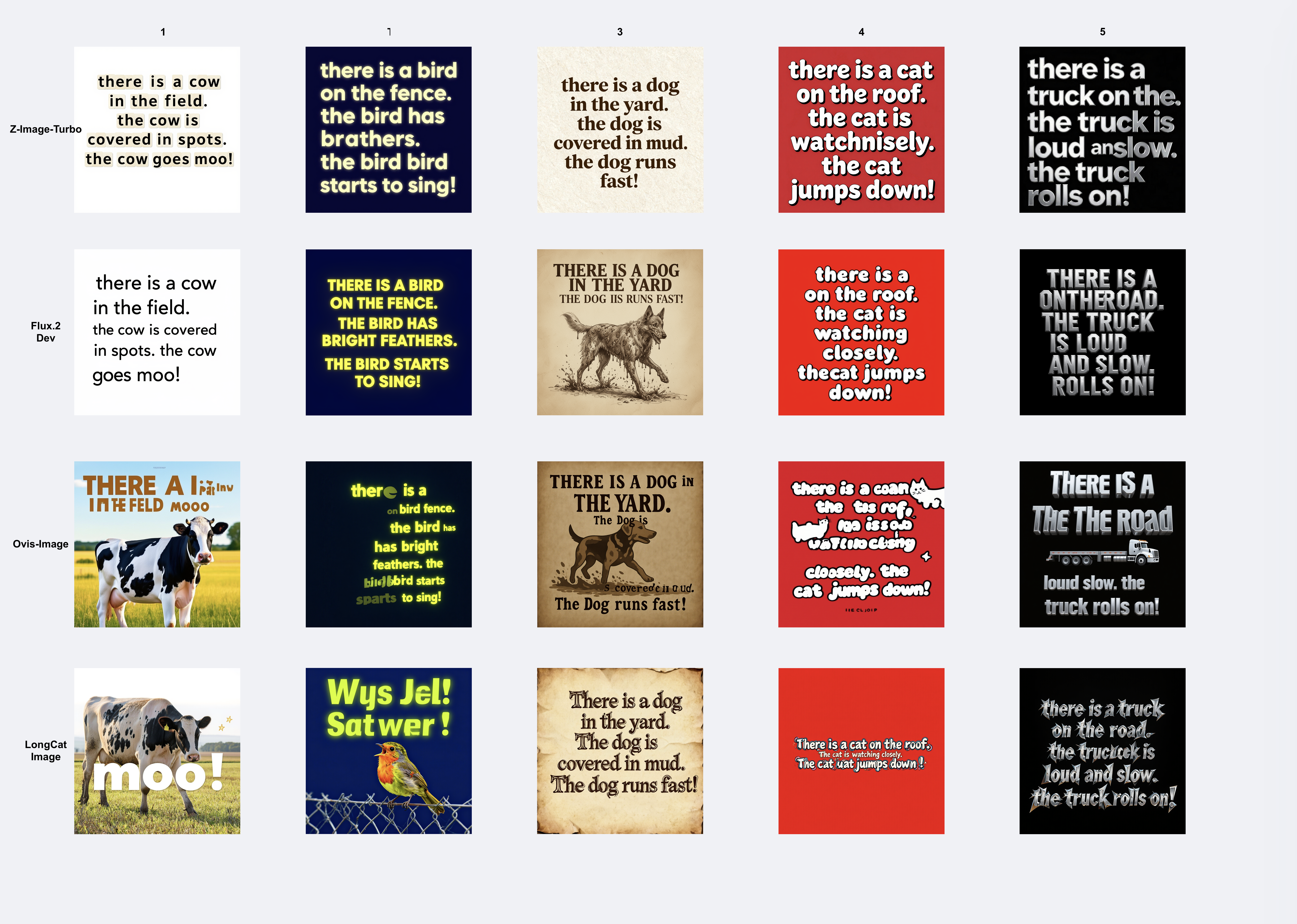
We can see the results of the generated images in the grid above, and the corresponding results of the test for each model’s WER according to our analysis are as follows:
| Model | WER |
|---|---|
| Z-Image-Turbo | 0.07206 |
| Flux.2 Dev | 0.14337412 |
| Ovis-Image | 0.80512 |
| LongCat-Image | 0.41176471 |
Clearly, Z-Image-Turbo is the outstanding model here once again. Flux.2 Dev came extremely close though, only really being held back by image 5. Both got nearly perfect scores and were good at adhering to the prompt as well for style and color. Ovis-Image performed surprisingly poorly given its design, but this may have been a flaw of the prompt design more than anything. A more complex prompt may have yielded better answers. Finally, LongCat-Image seemed to either not understand the purpose of the prompt at all - instead drawing the words in the quotes rather than the words themselves, or perform extremely well - with all the words being printed correctly.
Prompt Adherence
Finally we get to the prompt adherence test. Here, we are going to use each of the image generators to generate a new series of images. We then qualitatively assess the output of the image with our own eyes to try and determine which model performs the best in terms of aesthetic quality.
Below we have our 5 prompts. These were created using Qwen3-8b by expanding upon smaller prompts we created for this article.
5 prompts:
- A richly detailed interior scene painted in the refined, luminous style of a neoclassical master, depicting a warm sunlit corner of a tranquil living room where soft golden light pours through an unseen window and settles gently across a deep brown leather chair. The chair, worn to perfection with subtle creases and a polished sheen, sits angled beside a handsome wall-inset bookshelf carved into the architecture itself. The shelves are filled with ancient tomes, dusty hardbound volumes, and weathered manuscripts whose faded spines and frayed edges suggest centuries of accumulated wisdom. The sunlight catches motes of dust drifting lazily in the air, illuminating the texture of the books, the smooth grain of the wooden shelving, and the soft shadows that pool in the corners of the room. Classical compositional balance, rich earth-tone palette, and delicate brushwork create an atmosphere of serenity, intellectual warmth, and timeless comfort, as though the space invites quiet reading, reflection, and peaceful solitude.
- A hyper-realistic wildlife photograph in the style of National Geographic, capturing an extraordinary alien creature mid-motion as it swings effortlessly through a dense forest canopy. Its body is predominantly reptilian, covered in textured, iridescent scales that shift in color from deep emerald to bronze under dappled sunlight, yet its face is strangely mammalian—flat, soft-featured, with forward-facing eyes, a short snout, and expressive nostrils that flare as it moves. Multiple long, muscular tentacles extend from its torso and limbs, curling around branches with fluid precision, each lined with subtle ridges and suction-like pads that suggest powerful arboreal adaptation. The surrounding jungle is rendered with crisp photographic detail: shafts of sunlight filtering through layered leaves, drifting pollen and humidity haze, and bark textures sharp enough to feel. Motion blur along the outer tentacles emphasizes the creature’s swift, acrobatic swing. The overall composition evokes an authentic nature-documentary capture—scientific, dramatic, and awe-inspiring—blending the uncanny biology of an extraterrestrial species with the grounded visual language of real-world wildlife photography.
- A highly detailed sci-fi illustration depicting a Black astronaut in a sleek, modern spacesuit standing on the windswept, rust-red surface of Mars beneath a vast ochre sky. His suit is reinforced with metallic plating and illuminated control panels, while a perfectly clear glass helmet reveals his focused expression as he surveys the alien landscape. Fine dust swirls around his boots, kicked up by faint Martian winds, and the terrain stretches out in rocky ridges, scattered boulders, and distant mesas softened by atmospheric haze. Directly in front of him on the ground, a carefully arranged formation of smooth Martian stones spells out the word “WELCOME EARTHLING TO THE PLANET MARS!” in large, unmistakable letters. The message is partially dusted, as though recently uncovered or mysteriously placed. Subtle reflections of the sky and red soil curve across his helmet, while the long shadows of early Martian morning cast a cinematic, contemplative mood. The scene blends hard-science realism with a sense of wonder and curiosity, evoking both the loneliness of space exploration and the startling possibility of unexpected discovery.
- An atmospheric anime-style illustration of a quiet rural American town’s main street, drawn with rich cinematic detail and a blend of nostalgia and melancholy. Weathered, dilapidated buildings line the roadside, including the shuttered “Bob’s Pharmacy,” its faded signage peeling, windows boarded or cracked, and an old hand-painted prescription symbol barely visible beneath layers of dust and sun-bleached paint. Power lines sag overhead, creaking gently in the breeze, while tufts of dry grass push through cracks in the asphalt. In stark contrast, the nearby “Dollar General” glows brightly with harsh fluorescent light spilling across the pavement, its clean yellow signage vivid against the darkening sky, giving the street an eerie mix of abandonment and artificial life. A few distant cars sit unmoving, and warm sunset tones cast long shadows across storefronts, enhancing the sense of a once-bustling town now struggling to stay afloat. Subtle anime touches—soft gradient skies, detailed linework, reflective windows, and slightly exaggerated perspective—infuse the scene with emotional depth, capturing a poignant snapshot of rural decline and quiet resilience.
- A highly detailed, imaginative typographic illustration showcasing the entire English alphabet, each letter rendered with its own unique material, texture, and elemental style, arranged in a clean, harmonious, gallery-like layout against a softly lit neutral backdrop. The letter “A” appears as a sculpted form of flowing translucent water with ripples, bubbles, and shimmering highlights; “B” burns with vivid sculpted flames in glowing oranges and reds; “C” sprouts from lush green grass and tiny wildflowers; “D” is assembled from ceramic mosaic tiles that catch the light; “E” is formed from thick plush carpet fibers; and “F” grows from intertwining tree trunks and branches with bark, knots, and leaves. “G” gleams with polished smooth stone, while “H” is constructed from interlocking metal pipes with industrial sheen. “I” forms a solid block of carved ice with frosted edges; “J” jiggles as translucent gelatin; and “K” refracts light through facets of sparkling crystals and gemstones. “L” flows with molten liquid lava, glowing red-hot; “M” rises like rugged mountains carved from rocky terrain; “N” glows in vivid neon tubing; and “O” drifts like a soft ring of clouds. “P” folds elegantly from paper in origami style; “Q” is stitched from quilted patchwork fabric; “R” rusts with weathered oxidized metal texture; and “S” cascades in loose, grainy sand. “T” pulses with futuristic glowing circuitry; “U” is adorned with underwater coral, shells, and marine hues; “V” weaves together vines, leaves, and blossoms; and “W” swirls as transparent currents of wind. “X” is assembled from glowing x-ray bones, “Y” bounces with glossy yellow rubber, and “Z” is wrapped in bold zebra stripes or soft animal fur pattern. The entire composition blends hyperreal textures, vibrant lighting, and precision typographic forms, creating a radiant, visually rich alphabet that celebrates variety, creativity, and material storytelling.
As we can see, they vary a lot in terms of subject matter, style, and object content. Specifically, the first was meant to capture a still life photograph, the second a fictional nature image, the third a digital illustration, the fourth an anime style image, and finally a full alphabet composed of letters in different styles. Each was hoping to stretch the capabilities of each generator as far as possible. Let’s look at the results below:
As we can see, there is a big difference in the results for each model. Overall, Z-Image-Turbo and Flux.2 Dev are clearly in their own class in terms of prompt adherence, with Flux.2 Dev just barely edging out the former model, probably due to its larger size. LongCat-Image performs extremely well as well, but is held back by its failure to capture text as well as the others, showcased in the fourth image example. Ovis-Image overall feels like it is from a previous generation, and was clearly trained on ChatGPT generated images.
If prompt adherence is the most important, we therefore recommend Flux.2 Dev. It is incredibly capable at capturing fine to coarse details from the original prompt, putting them in the right place, and getting the right style. We recommend it over Z-Image-Turbo where absolute adherence to the prompt is required.
Overall Recommendation for best Text-To-Image Generator
In our opinion, based on the results in this review, Z-Image-Turbo is the best choice of this latest generation of image models. If we are scaling an image generation pipeline, it is far and away the most cost effective model while performing nearly as well in terms of aesthetic quality and text generation as much larger models like Flux.2 Dev. Flux.2 Dev is a better choice if time and cost are not important, but the difference is truly negligible between the capabilities of the two of them for the purposes of this review.
Thanks for learning with the DigitalOcean Community. Check out our offerings for compute, storage, networking, and managed databases.
About the author
Still looking for an answer?
This textbox defaults to using Markdown to format your answer.
You can type !ref in this text area to quickly search our full set of tutorials, documentation & marketplace offerings and insert the link!
 This work is licensed under a Creative Commons Attribution-NonCommercial- ShareAlike 4.0 International License.
Become a contributor for community
Get paid to write technical tutorials and select a tech-focused charity to receive a matching donation.

DigitalOcean Documentation
Full documentation for every DigitalOcean product.

Resources for startups and AI-native businesses
The Wave has everything you need to know about building a business, from raising funding to marketing your product.
The developer cloud
Scale up as you grow — whether you're running one virtual machine or ten thousand.

Start building today
From GPU-powered inference and Kubernetes to managed databases and storage, get everything you need to build, scale, and deploy intelligent applications.
